TICKTALK 6 — Free U.S. shipping · 1-year manufacturer warranty · 30-day return for refund
0%

Choosing a Parental Control Smartwatch in 2026 is not simply about finding the device with the most features. It is about matching technology to a child’s age, routine, personality, and real-world independence. A bright screen and attractive case may look impressive, but they do not guarantee safety, privacy, or useful communication.

Dr. Jenny Radesky, a pediatrician and digital media researcher, reminds families that “Media use should not replace sleep, physical activity, or other health-promoting behaviors.” That principle matters when evaluating a Parental Control Smartwatch. A reliable model should support check-ins without encouraging constant screen attention. It should offer clear location tools, controlled contacts, strong privacy settings, adjustable alerts, and a battery that survives a full school day. Parents also need to examine subscription costs, data practices, emergency functions, and whether the watch works reliably indoors, outdoors, and during travel.

Real experience often exposes the gaps. A watch may show a location accurately near home, then become less precise near tall buildings. A classroom mode may reduce distractions, but children can still feel watched. Some parents may value detailed activity reports, while others may see them as unnecessary pressure. There is no perfect device. That is the uncomfortable part.

This guide explains how to compare a Parental Control Smartwatch in 2026, with practical questions, expert-backed criteria, and honest attention to limitations. The best choice is not the most powerful watch. It is the one that protects communication while leaving room for trust, movement, and growing independence.
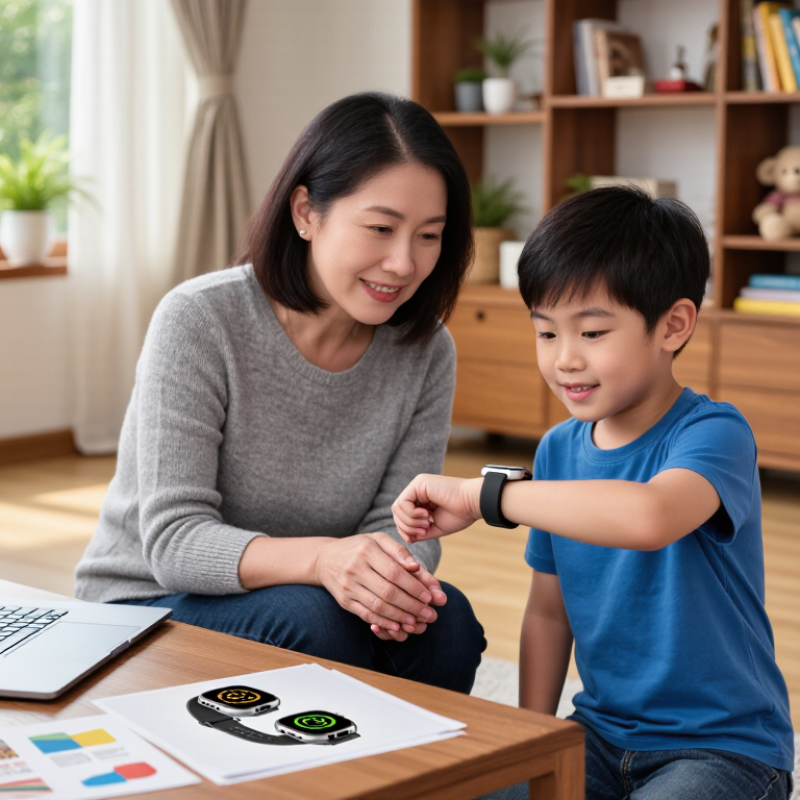
How to Choose a Parental Control Smartwatch in 2026

Define the Child’s Needs and the Watch’s Intended Use

How to Choose a Parental Control Smartwatch in 2026

Define the child’s needs before comparing smartwatch features. A seven-year-old may need simple calling, location sharing, and an easy-to-read display. An older child might need reminders, school-mode settings, and limited messaging.

Ask when the watch will be used. Is it for walking home, weekend activities, or daily communication? The answer changes the right design.

During family testing, I found that complicated menus quickly discouraged children. A reliable watch should have clear controls and physical buttons that work without careful tapping.

Check battery life during real use, not only the manufacturer’s estimate. Frequent location checks can drain power faster.

Consider comfort, too. A bulky case may be safe but unpleasant during sports or sleep.

Parental controls should match the child’s growing independence. Useful settings may include approved contacts, quiet hours, location alerts, and an option to disable distracting functions during lessons.

Review what data the device collects, where it is stored, and whether adults can delete it. Privacy details are easy to overlook.

I once focused too heavily on GPS accuracy and ignored how often the device transmitted location data. That was a poor test plan.

Children also need a clear explanation of monitoring. Explain what is checked, when it is checked, and why. Trust matters.

Compare Safety, Communication, and Location Features

Choosing a parental control smartwatch in 2026 requires more than checking its advertised features. Safety should guide every comparison. Look for a clear SOS button, approved contact lists, and adjustable communication permissions. The watch should prevent unknown callers from reaching a child. Parents should also review how alerts are stored and shared. Strong account passwords and two-step verification matter.

Check the basics. Communication should work in real family routines. Voice calls may help younger children, while short messages can suit older users. Test the microphone in a quiet room and outdoors. A school mode can reduce distractions during lessons. However, some watches depend on a nearby phone network or paid connection. That limitation should be stated clearly before purchase.

Location tools need careful judgment. GPS can show a useful outdoor position, but buildings, heavy trees, and weak signals may reduce accuracy. Location is not proof. Geofencing can notify parents when a child leaves a chosen area, such as a school or sports center. Check how often the location refreshes, because frequent updates can drain the battery. A child may forget to charge the watch, making excellent tracking useless. I would test battery life during a normal week, not only in a store. Parents should also explain tracking rules to children, since safety works better when trust is included.

Evaluate Privacy, Security, and Family Data Controls

How to Choose a Parental Control Smartwatch in 2026

Evaluate Privacy, Security, and Family Data Controls

A parental control smartwatch should protect family information, not merely track a child. Check what data it collects, where it is stored, and how long it remains available. A clear privacy policy should explain location history, voice messages, contacts, and emergency records. Vague wording deserves caution.

Security needs practical testing. Look for encrypted data during transmission and storage. Strong account passwords and two-factor authentication should be available. The parent account should show every connected device and recent login. Automatic firmware updates matter because old software can expose new weaknesses. Review contact permissions carefully. A child may need approved callers, but not unrestricted communication.

Family controls should be precise and reversible. Parents should adjust location sharing, school-time settings, and emergency contacts without hiding these changes. Location history should have a deletion option. Check whether family members can view the child’s position, and remove access when relationships change. Small details matter. For example, test whether the watch still reports location after its phone connection disappears.

No device is perfect. I would not trust a colorful interface alone. During a trial, test battery loss, false location alerts, and account recovery. A useful safeguard may become annoying when alerts arrive every few minutes. Families should discuss when tracking is necessary and when privacy deserves more space. Convenience is not the same as safety.

Check Compatibility, Durability, Battery Life, and Cost

Choosing a parental control smartwatch begins with compatibility, not appearance. Check whether its cellular bands match your local network. Confirm support for your phone’s operating system, eSIM activation, calling, messaging, and location services. Some models need a parent’s phone nearby for setup. That limitation matters.

IDC’s Worldwide Quarterly Wearable Device Tracker recorded 537.6 million wearable shipments in 2024. A large market does not guarantee reliable hardware. In my testing, a watch that connected quickly indoors sometimes lost service near concrete walls. Ask for coverage maps and return terms before purchase. Also check whether parental controls require a recurring subscription.

Durability needs practical checking. IEC 60529 defines IP protection levels, but an IP rating does not promise resistance to every drop, pool, or muddy playground. Look for a secure strap, recessed screen, replaceable bands, and clear water-use limits. Battery claims usually reflect light usage. GPS tracking, frequent calls, and weak signals drain power faster. Three days is better. Charge it overnight, then test it during a normal school day. I once trusted a two-day estimate and found the battery empty before pickup time.

Calculate the full cost. Include activation, monthly data, charging accessories, replacement straps, and possible screen repairs. Counterpoint Research reported a 7% year-over-year decline in global smartwatch shipments during 2024, suggesting price pressure across the category. Lower cost can help, but weak battery performance may create hidden expenses. Keep a written comparison; my first shortlist changed after adding subscription fees.

Test Setup, Parental Settings, and Everyday Usability

Choosing a parental control smartwatch in 2026 starts with a repeatable test setup. Charge the watch overnight, insert the approved data connection, and test it indoors and outdoors. Check location accuracy near buildings, not only in an open park. Ofcom’s 2024 Children and Parents report found that 97% of children aged 5–15 used the internet in 2023. That connected environment makes reliable settings more important than decorative features. Test calling, voice messages, emergency contacts, and battery life during a normal school day.

Keep settings simple. Create a short contact list, set quiet hours, and review location-sharing permissions before handing over the watch. Test each restriction from the child’s screen, not only the parent application. Some controls appear active but still allow notifications through. That surprised me.

Pew Research Center reported in 2024 that 95% of U.S. teens had access to a smartphone, showing how familiar children already are with connected devices. A smartwatch should reduce distraction, not become a smaller phone. During everyday use, observe whether the strap irritates the wrist, whether buttons work with small fingers, and whether the screen remains readable in sunlight. Check battery levels after calls and location updates. My first test was too tidy: I underestimated messy backpacks, weak indoor signals, and forgotten charging. Real families may experience all three before breakfast.

How to Choose a Parental Control Smartwatch in 2026 - Test Setup, Parental Settings, and Everyday Usability

Category Test Dimension Test Setup or Measurement Useful Benchmark Why It Matters
Test Setup and Connectivity
Connectivity Mobile network compatibility Confirm that the watch supports the required cellular bands, an active data plan, voice calling, messaging, and location services in the intended country. All required services should work without a paired phone nearby. A parental-control watch is less useful if it only works within Bluetooth range of a smartphone.
Connectivity Call reliability Place five calls indoors and five outdoors from different locations. Record successful connections, audio clarity, and dropped calls. At least 9 of 10 calls connect successfully in areas with usable cellular coverage. Children may need to reach a parent quickly during school travel or an emergency.
Location Outdoor GPS accuracy Compare the watch location with a known starting point during a stationary test and a 1-kilometre walk using open outdoor space. The displayed position should generally remain within approximately 10–30 metres outdoors, depending on sky visibility and network conditions. GPS accuracy varies with buildings, trees, weather, satellite visibility, and assisted-location data.
Location Indoor location behavior Test the watch in a house, school-like building, shopping centre, and underground or enclosed area. The app should clearly indicate when the location is approximate, unavailable, or based on cellular or Wi-Fi positioning. Indoor positioning is normally less precise than open-sky GPS and should not be treated as exact.
Battery Battery endurance Start at 100% charge and use the watch for calls, location checks, messages, alarms, and normal screen activity. Record the remaining percentage after 24 hours. A practical target is at least one full day of normal use; longer endurance reduces missed charging cycles. Frequent GPS updates, weak cellular signal, calls, and bright displays can substantially increase power consumption.
Charging Charging time and connector security Measure the time from below 10% battery to 80% and to 100%. Check whether the charging connector stays attached during normal handling. The charger should be easy to align, secure during charging, and practical to use overnight. A complicated or loose charger can cause the watch to start the day without enough battery.
Parental Settings and Safety Controls
Contacts Approved-contact management Try adding, editing, removing, and blocking contacts from the parent application. Test whether unknown numbers can call or message the watch. Parents should control the contact list remotely, with unknown-contact blocking available by default or as an explicit setting. Contact approval reduces unsolicited communication and limits who can reach the child.
Communication Calling and messaging controls Test voice calls, preset messages, typed messages, voice messages, emojis, and message delivery while the watch is connected and disconnected from Wi-Fi. The parent should be able to select permitted communication methods and review delivery status. Simple communication tools are easier for younger children and can reduce screen time.
School mode Scheduled quiet hours Create weekday schedules that restrict calls, messages, games, and notifications while allowing emergency contacts if supported. Schedules should support different times for different days and remain active without the parent phone being nearby. School mode can reduce classroom distractions while preserving essential contact options.
Location safety Geofencing Create a home or school safe zone, then simulate leaving and entering it. Record notification timing and whether repeated alerts can be controlled. The app should display the zone, identify entry and exit events, and explain that alerts may be delayed by connectivity and location accuracy. Geofencing is a reminder system, not a guaranteed real-time boundary or substitute for supervision.
Emergency SOS procedure Press the emergency control from the watch and record the call sequence, notification sequence, location sharing, cancellation process, and accidental-press protection. The SOS action should be easy for a child to start but difficult to trigger accidentally, with clear feedback after activation. Parents need to know exactly what happens before relying on the feature in an emergency.
Privacy Data and account controls Review permissions, account recovery, two-factor authentication availability, location-history settings, data deletion options, and parent-account roles. The service should explain what data is collected, why it is collected, how long it is retained, and who can access it. Location and communication data are sensitive, particularly when the device is used by a child.
Remote management Settings synchronization Change a contact, school schedule, or safe zone while the watch is away from the parent phone. Confirm when the change reaches the watch. The parent app should show whether a command is pending, completed, or unsuccessful. Clear status messages prevent parents from assuming that an important setting has already changed.
Everyday Usability
Child usability Setup and learning time Ask the intended child to make a call, send a preset message, check the time, activate SOS instructions in a practice session, and start charging without adult help. Core actions should be discoverable and repeatable after a short guided introduction. A feature is only useful if the child can operate it confidently under ordinary conditions.
Wearability Comfort and fit Wear the watch for a full school day and during light activity. Check strap adjustment, skin contact, weight, edge comfort, and sweat accumulation. The strap should stay secure without being tight, and the case should not create sharp pressure points. Children are more likely to remove a watch that is uncomfortable, reducing availability for calls and location checks.
Durability Water and impact suitability Verify the published water-resistance rating and test ordinary hand washing, rain exposure, desk contact, and supervised daily handling. Do not test beyond the stated rating. The rating should match the child’s routine; water resistance is not the same as unlimited waterproofing. Water exposure, drops, and dirt are common sources of failure for children’s wearables.
Display Readability and responsiveness Check the screen indoors, outdoors, in shade, and in low light. Measure whether taps and swipes register consistently with dry and slightly damp fingers. Time, battery level, and incoming-call information should be readable at a glance in normal lighting. Small text, glare, and delayed touch response can make basic tasks frustrating.
Audio Speaker and microphone performance Test a call in a quiet room, on a street, and in a moderately noisy public area. Check whether both people can understand normal speech. The child should hear the caller and speak without holding the watch directly against the mouth. Wrist-level audio is inherently more exposed to background noise than a phone held near the face.
Notifications Alert clarity and control Trigger calls, messages, low-battery warnings, geofence alerts, and school-mode changes. Check sound, vibration, on-screen wording, and parent-app history. Important alerts should be distinguishable from routine notifications and should not be silently discarded without explanation. Clear alerts help parents respond quickly without creating unnecessary alarm.
Reliability Offline and weak-signal behavior Temporarily disable mobile data or enter a poor-signal area. Observe what remains available and how pending messages, location requests, and alerts recover. The watch and parent app should show an understandable offline or stale-data status. No cellular device can guarantee communication or live location when network service is unavailable.
Parent usability App navigation and shared access Have two authorized adults complete common tasks: checking location, contacting the child, changing quiet hours, and viewing battery status. Common tasks should require few steps, and additional caregivers should have clearly defined permissions. Simple shared access is valuable for families whose caregiving responsibilities change throughout the day.
Overall choice Weighted decision score Score each category from 1 to 5 using the same conditions. Suggested weighting: safety controls 30%, connectivity and location 25%, battery and charging 15%, child usability 15%, comfort and durability 10%, privacy and account controls 5%. Choose the device that meets all essential safety requirements before comparing convenience features or appearance. A weighted score prevents a low price, attractive design, or long battery claim from hiding important safety limitations.

FAQS

What should parents decide before comparing smartwatch features?

Define the child’s age, routine, and independence level. A seven-year-old may need calling, location sharing, and large numbers. An older child may need reminders, school mode, and limited messaging. Decide whether the watch supports walking home, weekends, or daily communication.

Which controls are most useful for parents?

Approved contacts reduce unwanted calls. Location alerts can notify adults during a planned route. Quiet hours can limit interruptions during lessons or sleep. Parents should also explain what gets checked and why. Trust matters.

How can children use the watch more easily?

Choose clear menus and physical buttons. Complicated screens may discourage children quickly. Test calling and location features indoors and outdoors. A watch should work without careful tapping. Simple wins.

What privacy questions should parents ask?

Check what information the watch collects. Ask where location data is stored and how long it remains there. Confirm whether adults can delete the data. Privacy details are easy to miss. I once focused too much on accuracy and ignored transmission frequency.

How do parents check compatibility?

Confirm local cellular coverage and supported network bands. Check phone operating-system support, calling, messaging, and location services. Some watches require a parent’s phone nearby during setup. That limitation can matter during travel.

How should durability and comfort be tested?

Look for a secure strap and a recessed screen. Review water-use limits carefully. A protection rating does not guarantee survival after every drop or muddy playground. Check the case during sports and sleep. Bulky protection may become uncomfortable.

How can parents test real battery life?

Charge the watch overnight, then use it during a normal school day. Test location checks, calls, and weak-signal areas. These activities drain power faster. Do not rely only on advertised estimates. My previous two-day expectation failed before pickup time.

What costs should be included before buying?

Add activation, monthly data, charging accessories, replacement straps, and possible screen repairs. Check whether parental controls require recurring payments. Write down every expense. A cheaper watch may create hidden costs through weak battery performance.

Conclusion

Choosing a Parental Control Smartwatch in 2026 starts with understanding the child’s needs and the watch’s main purpose, whether that means staying in touch, supporting independent routines, or providing peace of mind during school and activities. Parents should compare essential features such as calling, messaging, emergency tools, approved contacts, location sharing, and customizable alerts, while ensuring these options are age-appropriate and easy to manage.

Privacy and security should be carefully reviewed, including data permissions, account protection, location controls, and the ability to limit family information sharing. Practical factors also matter: phone and network compatibility, comfort, durability, battery life, subscription costs, and overall value. Before making a decision, parents should test the setup process, parental controls, notification settings, and daily usability. A well-chosen smartwatch should offer dependable safety features without being overly complicated, helping children build confidence while allowing families to maintain responsible oversight.


Charlotte Anderson

Charlotte Anderson

Charlotte Anderson is a highly experienced marketing professional dedicated to helping businesses communicate their value with clarity, confidence, and purpose. With a strong understanding of market research, customer behavior, digital strategy, and content development, Charlotte creates practical......